Do AI Crawlers Run JavaScript? What GPTBot and ClaudeBot See
Googlebot runs JavaScript; GPTBot, ClaudeBot and PerplexityBot do not. Content that only appears after JS runs is invisible to AI search. How to test your page and fix it with SSR, SSG or pre-rendering.
By — CTO, ERPFit
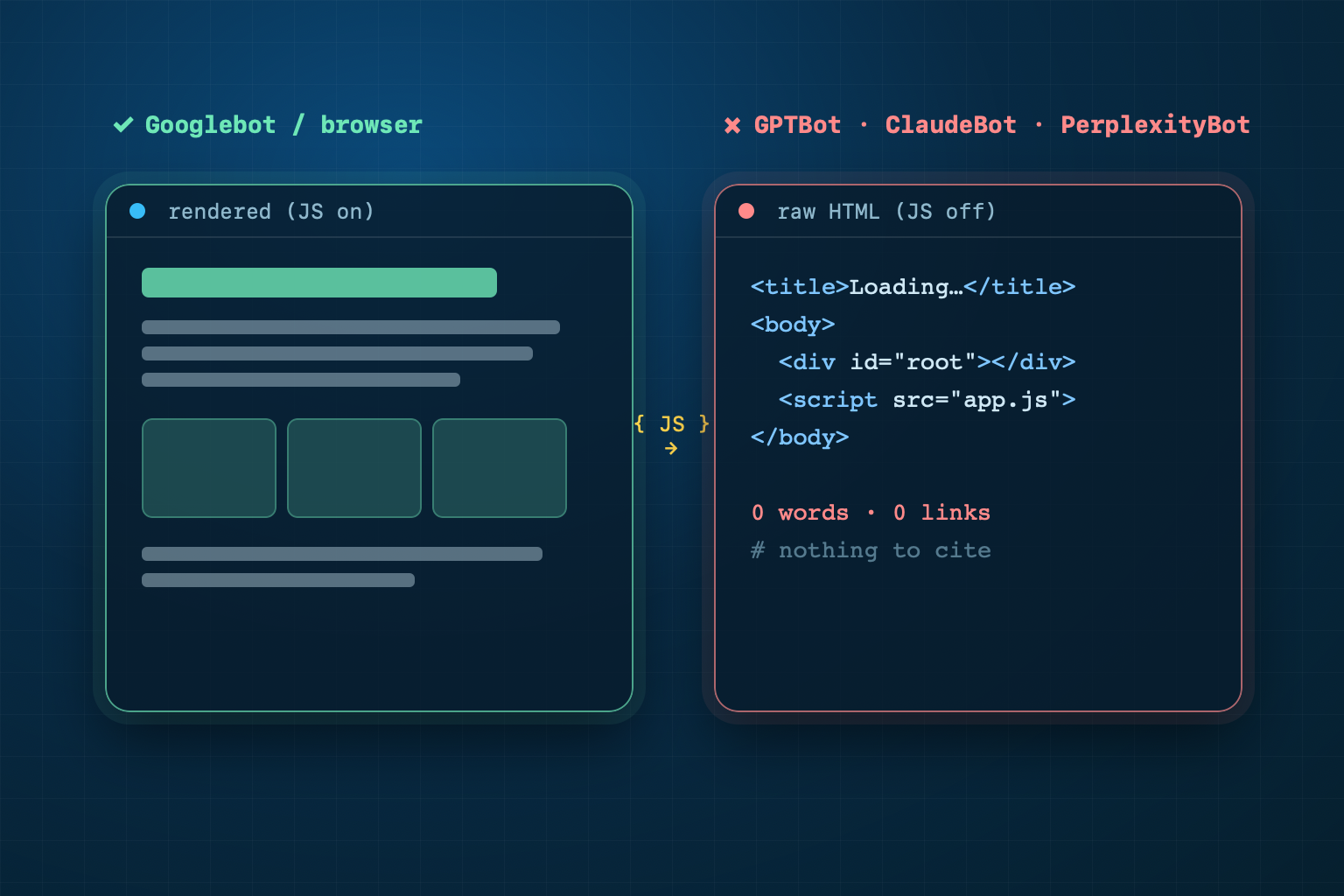
Short answer: Google and Apple run your JavaScript; the AI crawlers behind ChatGPT, Claude and Perplexity do not. (Some newer assistants, such as DeepSeek and Qwen, do.) Googlebot renders pages after a queue, so JS-built content can reach Google Search and AI Overviews. GPTBot, ClaudeBot, PerplexityBot and CCBot read only the HTML your server sends. If your text, title or links appear only after JavaScript runs, those bots see an empty page and cannot cite it.
Key Takeaways
- Google processes JavaScript pages in three phases (crawl, render, index); rendering waits in a queue that "can take longer" than a few seconds (Google Search Central, updated March 2026).
- Vercel and MERJ measured about 1.3 billion AI-crawler fetches in one month (December 2024). Their finding: "none of the major AI crawlers currently render JavaScript", GPTBot, ClaudeBot, PerplexityBot and CCBot among them. Google's and Apple's crawlers were the exceptions.
- ChatGPT's and Claude's crawlers do download JS files (11.5% and 23.8% of their requests) but do not execute them. A 2026 controlled test of twelve assistants found the same for ChatGPT, Claude, Gemini, Perplexity and Copilot on a live fetch.
- The fix is to put the main text, title, meta description, canonical, H1, JSON-LD and links in the first HTML response: server-side rendering, static generation or pre-rendering.
Does Google run JavaScript?
Yes, after a delay. Google's JavaScript SEO documentation describes three phases: crawling, rendering and indexing. Googlebot "queues all pages with a 200 HTTP status code for rendering," and "the page may stay on this queue for a few seconds, but it can take longer than that." When resources allow, "a headless Chromium renders the page and executes the JavaScript." A page with noindex may skip rendering altogether.
So Google does see client-rendered content, with a delay. That matters for AI too. Google's page AI features and your website sets one condition for AI Overviews and AI Mode: the page must be "indexed and eligible to be shown in Google Search with a snippet." It adds: "There are no additional technical requirements." Vercel's study adds that Gemini "leverages Googlebot's infrastructure, enabling full JavaScript rendering." Google still recommends serving finished HTML. In its words, "server-side or pre-rendering is still a great idea." The reason: it "makes your website faster for users and crawlers, and not all bots can run JavaScript."
Do AI crawlers run JavaScript?
Mostly no. The bot pages of OpenAI, Anthropic and Perplexity describe user agents and robots.txt; none of them mentions JavaScript or rendering (checked 19 October 2026). The best public measurement comes from Vercel and the consultancy MERJ, who analysed one month of crawler traffic on Vercel's network (published 17 December 2024):
| Crawler | Fetches in one month | Runs JavaScript? |
|---|---|---|
| Googlebot (Search + Gemini) | 4.5 billion | Yes |
| GPTBot (OpenAI) | 569 million | No |
| Claude (Anthropic) | 370 million | No |
| AppleBot | 314 million | Yes |
| PerplexityBot | 24.4 million | No |
| CCBot, Bytespider, Meta-ExternalAgent | not given | No |
In Vercel and MERJ's December 2024 data, GPTBot (569 million fetches), Claude (370 million) and PerplexityBot (24.4 million) did not execute JavaScript. Source: Vercel, "The rise of the AI crawler".
The study puts it plainly: "ChatGPT and Claude crawlers do fetch JavaScript files (ChatGPT: 11.50%, Claude: 23.84% of requests), they don't execute them. They can't read client-side rendered content." There is one nuance. Data already inside the first HTML response, such as embedded JSON or streamed React Server Components, "may still be indexed".
A newer test points the same way. In a 2026 controlled test of twelve AI assistants, ChatGPT, Claude, Gemini, Meta AI, Perplexity and Copilot did not run the page's script. Only DeepSeek, ERNIE, Qwen, Kimi and Mistral did.
The test was run by Andre Alpar's team and reported by Gianluca Fiorelli on Advanced Web Ranking in August 2026. Each assistant got its own secret page. The real reference number appeared only after an external script ran; the raw HTML held a decoy. The six assistants above reported the decoy.
Why does Gemini fail when Google renders JavaScript? Fiorelli's explanation: Google renders when it indexes a page, while the test was a live fetch of a brand-new URL. Crawlers change, so treat these studies as the baseline and test your own pages. More on these bots in AI crawlers.
What does an AI crawler see on a client-rendered page?
Almost nothing. A typical single-page app sends HTML like this:
<html>
  <head><title>Loading…</title></head>
  <body>
    <div id="root"></div>
    <script src="/assets/app.js"></script>
  </body>
</html>
A browser runs app.js and fills the page. GPTBot stops at the HTML: the title says "Loading…", there is no H1, no paragraph, no product price, and no links to follow. Nothing on that page can become a passage in a ChatGPT or Perplexity answer.
We ran that exact shell through CiteStat's own HTML parser, the code our scan uses on every page: 0 visible words, 0 links, the title "Loading…", and both JavaScript rules failed. The same test on our server-rendered post AI crawlers and robots.txt finds 917 words and 52 links in the raw HTML. We then checked our own live pages the same way:
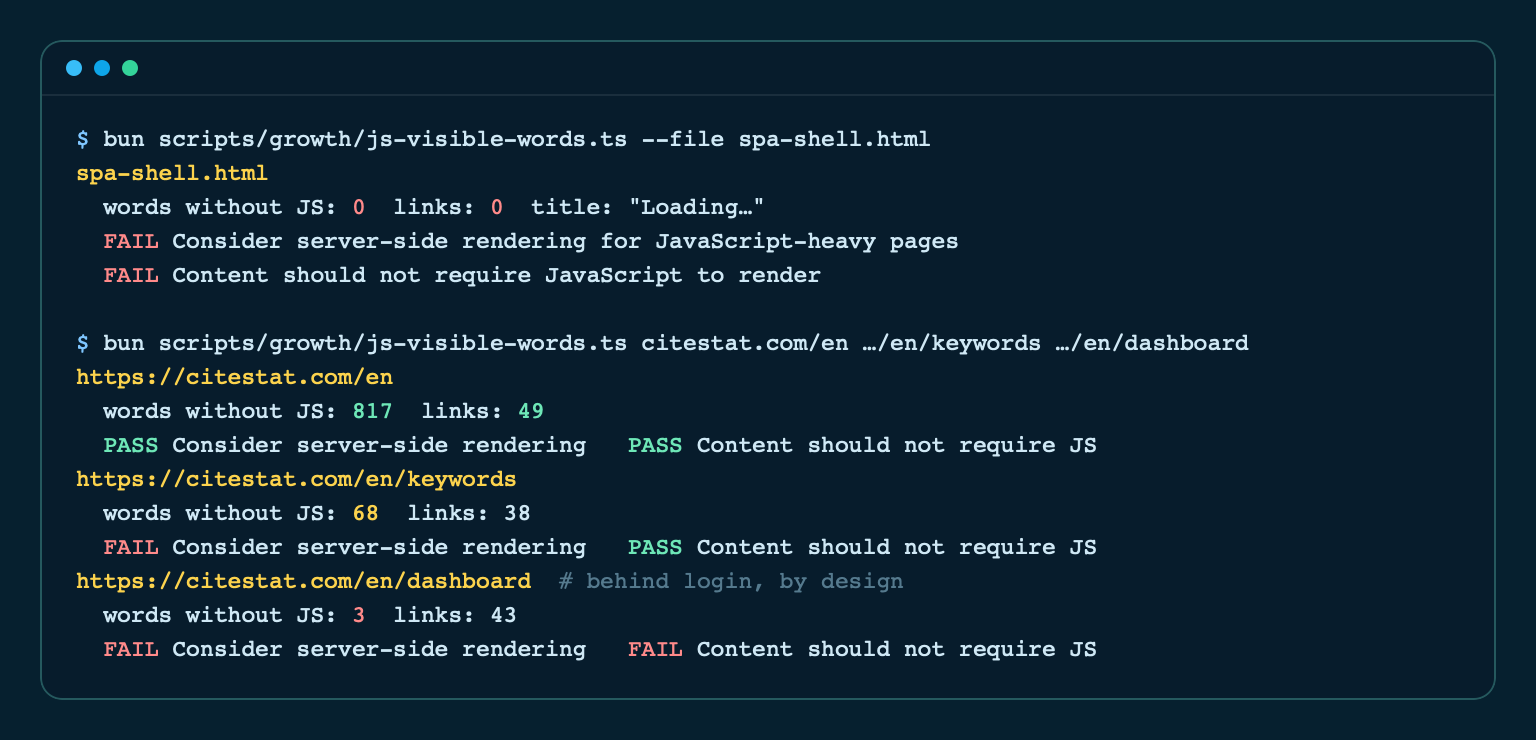
The home page passes with 817 words. Our keyword tool page has only 68 words without JavaScript, because the keyword ideas load after you type; the static explanation is there, the results are not. The dashboard shows 3 words, which is fine: it sits behind a login and should not be cited. The lesson is to judge each page by what it is for. This is why JavaScript SEO matters for AI search: a page can rank in Google and still be empty for the engines that write answers.
Six things belong in the first HTML response
You do not have to remove JavaScript. You have to make sure the parts machines read arrive without it:
- Main text: headings and the paragraphs that answer the reader's question. These are the passages AI systems quote; see citability.
- Title, meta description and canonical, set on the server, not by a client-side head manager.
- One H1 in the HTML.
- Structured data as inline JSON-LD. Google can read injected JSON-LD; most other crawlers cannot.
- Navigation as real links:
<a href="/pricing">, not adivwith a click handler. Crawlers followhref, not events; see internal linking. - Correct status codes: a missing page must return 404 from the server, not a 200 with "Not found" drawn by JavaScript.
Interactive extras such as filters, carousels, chat widgets and calculators can stay client-side. Vercel's advice is the same: "Client-side rendering still works for enhancement features."
Three ways to fix a JavaScript-only page
1. Server-side rendering (SSR)
The server builds the full HTML for each request. Next.js, Nuxt, SvelteKit, Remix and Astro support it. Best for pages that change often, such as prices or stock.
2. Static generation (SSG)
The HTML is built once at deploy time and served as files. Ideal for blogs, documentation and service pages. It is also the fastest option, which helps Core Web Vitals.
3. Pre-rendering an existing SPA
If rewriting is not an option, a pre-render step or service saves the rendered HTML of each route and serves it to every visitor. Serve the same HTML to users and bots: showing bots different content is cloaking, which search engines penalise.
WordPress, Shopify and most classic CMS themes already render on the server. The risk is in custom React or Vue builds, page builders that load content through AJAX, and product grids filled by an API call after the page loads.
How can you test your own page in two minutes?
- View the source, not the inspector. In Chrome press
Ctrl+U(Cmd+Option+Uon Mac). This is the HTML the server sent. Search it for a sentence from your page. If the sentence is missing, AI crawlers do not see it. - Turn JavaScript off. Chrome DevTools → Command menu (
Ctrl+Shift+P) → "Disable JavaScript", then reload. What remains is roughly what GPTBot reads. - Use the command line.
curl -s https://example.com/page | grep -c "your sentence"returns 0 if the text is not in the HTML.
How does CiteStat check it?
CiteStat fetches your page's raw HTML without running JavaScript, the same view an AI crawler gets, and counts the words visible there. The rules engine raises a warning when fewer than 50 words are visible without JavaScript ("Content should not require JavaScript to render") and suggests server-side rendering below 100 words. It also checks for crawlable <a href> links, History API routing instead of # fragments, and meaningful status codes, alongside the robots.txt reading for 10 AI crawler tokens.
The free plan includes 10 scans a day. For several sites, or the full AI render report that shows which passages Google AI Overviews and Bing Copilot would extract, see pricing: Pro is 500.000₫/month (excl. VAT) for 100 scans a day.