AI Overviews and nosnippet, max-snippet: How to Control What Google's AI Quotes
Google has no separate AI Overviews opt-out. The real controls are nosnippet, max-snippet, data-nosnippet and noindex. What each one does, why Google-Extended is not one of them, and four traps that make the setting do nothing.
By — CTO, ERPFit
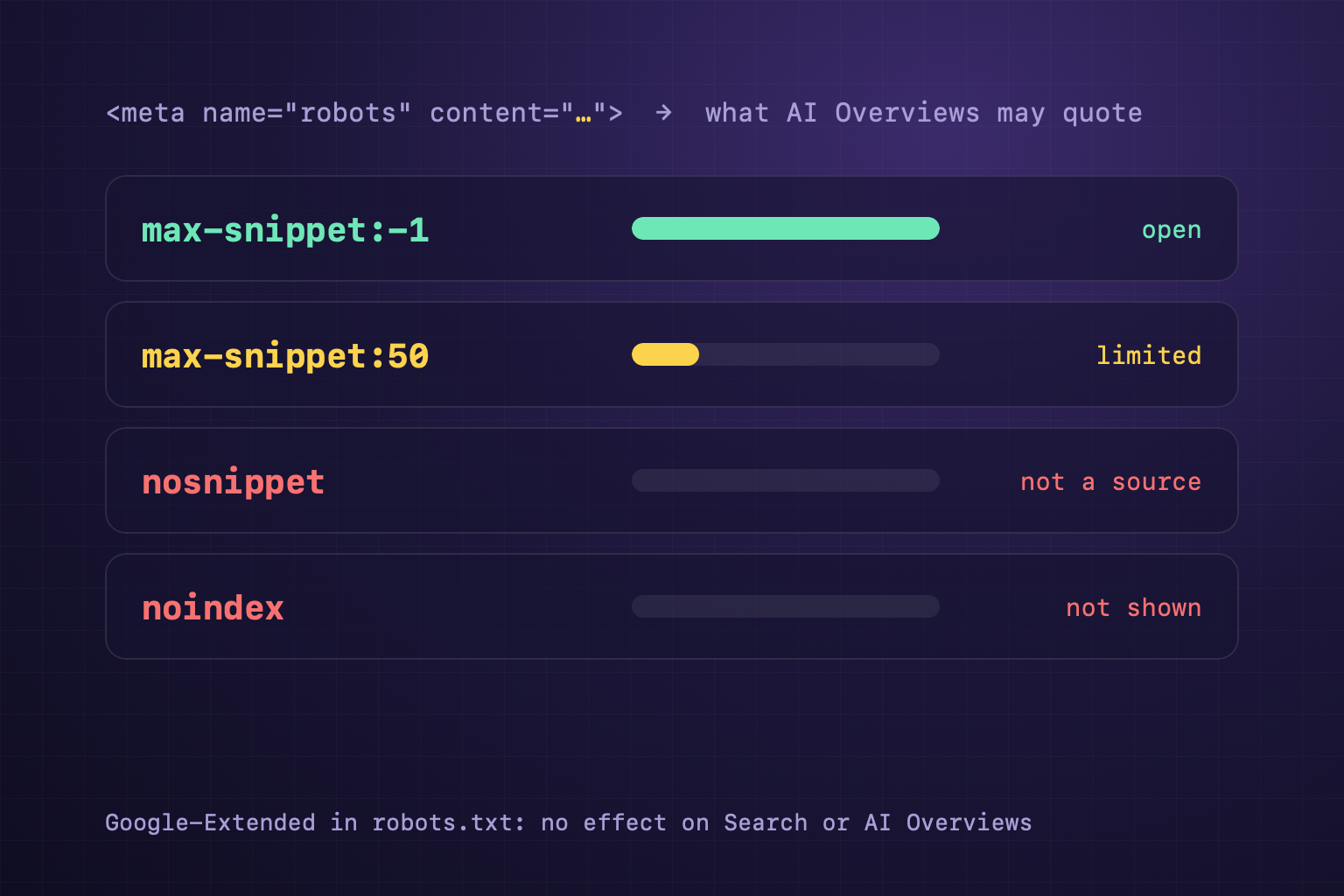
Short answer: Google has no separate switch for AI Overviews or AI Mode. According to Google's AI features guide, the way to limit what is taken from your pages is four controls that have existed for years: nosnippet, data-nosnippet, max-snippet and noindex. Google-Extended is not on that list. Most sites should leave pages open (the default, or max-snippet:-1), because a page with no snippet cannot be a supporting link in AI Overviews either.
Four controls and what each one does
The concept in one page: snippet controls. All of them are set with a robots (or googlebot) meta tag in the HTML or with the X-Robots-Tag HTTP header, except data-nosnippet, which is an HTML attribute. Source: Google's robots meta tag documentation (updated 24 March 2026).
| Setting | Google Search | AI Overviews and AI Mode |
|---|---|---|
noindex | Page not shown | Cannot be a source (must be indexed) |
nosnippet | Title and link, no text snippet | Google says it will "prevent the content from being used as a direct input" for AI Overviews and AI Mode |
max-snippet:0 | Same as nosnippet | Same as nosnippet |
max-snippet:50 | Snippet of at most 50 characters | Limits how much content may be used as a direct input |
max-snippet:-1 | No limit (same as the default) | No limit |
data-nosnippet | Marked text is not used in snippets | Google lists it among the controls for AI features |
The condition that matters most is in the AI features guide: to be shown as a supporting link in AI Overviews or AI Mode, a page must be indexed and eligible to be shown in Google Search with a snippet. So nosnippet is not a way to "hide my text from the AI but still be cited". It takes the page out of the pool of sources.
Google-Extended is not this switch
Many site owners block Google-Extended in robots.txt and believe they have left AI Overviews. They have not. According to Google's crawler documentation (updated 15 October 2026), Google-Extended only decides whether content may be used to train Gemini and for grounding in Gemini Apps and Vertex AI, and it "does not impact a site's inclusion in Google Search". AI Overviews are part of Search. For the other AI bots, see AI crawlers and robots.txt and the AI crawlers wiki page.
We checked 8 pages
On 20 October 2026 we read the robots/googlebot meta tags, the X-Robots-Tag header and data-nosnippet on 8 pages, using the code the CiteStat scan will use (packages/core/snippet-controls.ts):
| Page | Rules found | AI Overviews |
|---|---|---|
| citestat.com (3 pages: home, a blog post, a wiki page) | max-snippet:-1, max-image-preview:large in both the meta tag and X-Robots-Tag | Open |
| docs.claude.com, docs.stripe.com, vercel.com/docs, developers.cloudflare.com, erpfit.com | No rules | Open (default) |
None of them limit snippets. That is the sensible choice for documentation and product pages, which want to be quoted. Our pages state -1 in two places. Note that an explicit -1 cannot override a stricter value set somewhere else, because Google always applies the more restrictive rule.
Four traps that make the setting do nothing
- Blocking the page in robots.txt. Google writes that if a page is disallowed from crawling, any indexing or serving rules on it "will not be found and will therefore be ignored". A blocked page can still appear through links from elsewhere, and nobody reads your
nosnippet. - Two places, two values. The meta tag says
max-snippet:-1, but an SEO plugin or a CDN addsX-Robots-Tag: max-snippet:50. On a conflict the stricter rule wins, so the page gets 50 characters. Check both the HTML and the headers. data-nosnippeton the wrong element. Google accepts it only onspan,divandsection. On a<p>it is ignored. An unclosed<div data-nosnippet>hides everything after it. Do not add or remove the attribute with JavaScript after the page loads.- Not waiting long enough. Google has to recrawl the page to see the change, which the AI features guide says can take "anywhere from several days to several months". Use URL Inspection in Search Console to request a recrawl and see what Google read.
Should you limit snippets at all?
For most sites, no. The snippet is what makes a searcher click, and AI Overviews only link to pages that can have one. Cases worth considering:
- Paid content: a small
max-snippeton article pages lets Google understand the topic without quoting the whole answer. - One sensitive passage on a public page (for example internal prices in a comparison table): wrap that passage in
<div data-nosnippet>instead of locking the whole page. - Pages that should not appear at all (thank-you pages, internal search results): use noindex, not nosnippet.
Structured data is an exception: Google says these limits do not affect the use of JSON-LD on the page, except its description fields. Content you want quoted should be easy to quote; see citability.
Check your own page in one minute
Headers: curl -sI https://your-site/page | grep -i x-robots-tag. HTML: curl -s https://your-site/page | grep -io '<meta name="\(robots\|googlebot\)"[^>]*>'. Nothing found means the page is open by default. If you see nosnippet, max-snippet:0, noindex or none and you did not set it on purpose, fix it first.
What does CiteStat check?
The CiteStat scan reports noindex on the scanned page and reads robots.txt for Googlebot and 10 AI crawlers. It also reads nosnippet, max-snippet and data-nosnippet from both the robots meta tags and the X-Robots-Tag header, applies the stricter value on a conflict, and tells you in the AI Visibility card whether the page can be quoted in AI Overviews. The free plan includes 10 scans a day. If you manage several sites, see pricing: Pro is 500.000₫/month (excl. VAT) for 100 scans a day.
FAQ
Can I stay out of AI Overviews but stay in Google Search?
Not fully. Google has no separate AI Overviews switch. nosnippet or max-snippet:0 stops the page being a direct input for AI Overviews and AI Mode, but it also removes the page's text snippet from normal results. The page stays indexed.
Does blocking Google-Extended remove my site from AI Overviews?
No. Google-Extended controls training and grounding for Gemini Apps and Vertex AI. Google states it does not affect a site's inclusion in Google Search. AI Overviews are part of Search, so the controls are nosnippet and max-snippet.
What does max-snippet:-1 mean?
No limit: Google picks the snippet length it finds most effective. It is also the default when a page sets nothing. Writing -1 explicitly does not override a stricter value set elsewhere, because on a conflict Google applies the more restrictive rule.
Which elements can carry data-nosnippet?
Only span, div and section. On p, li or a custom tag, Google ignores it. The HTML must be valid: an unclosed div hides everything after it.