What Is an Open Graph Image? Size and 7 Preview Faults
og:image is the picture Facebook, LinkedIn and chat apps show when a link is shared. The right size, 7 common faults, and what we found on 11 real sites.
By — CTO, ERPFit
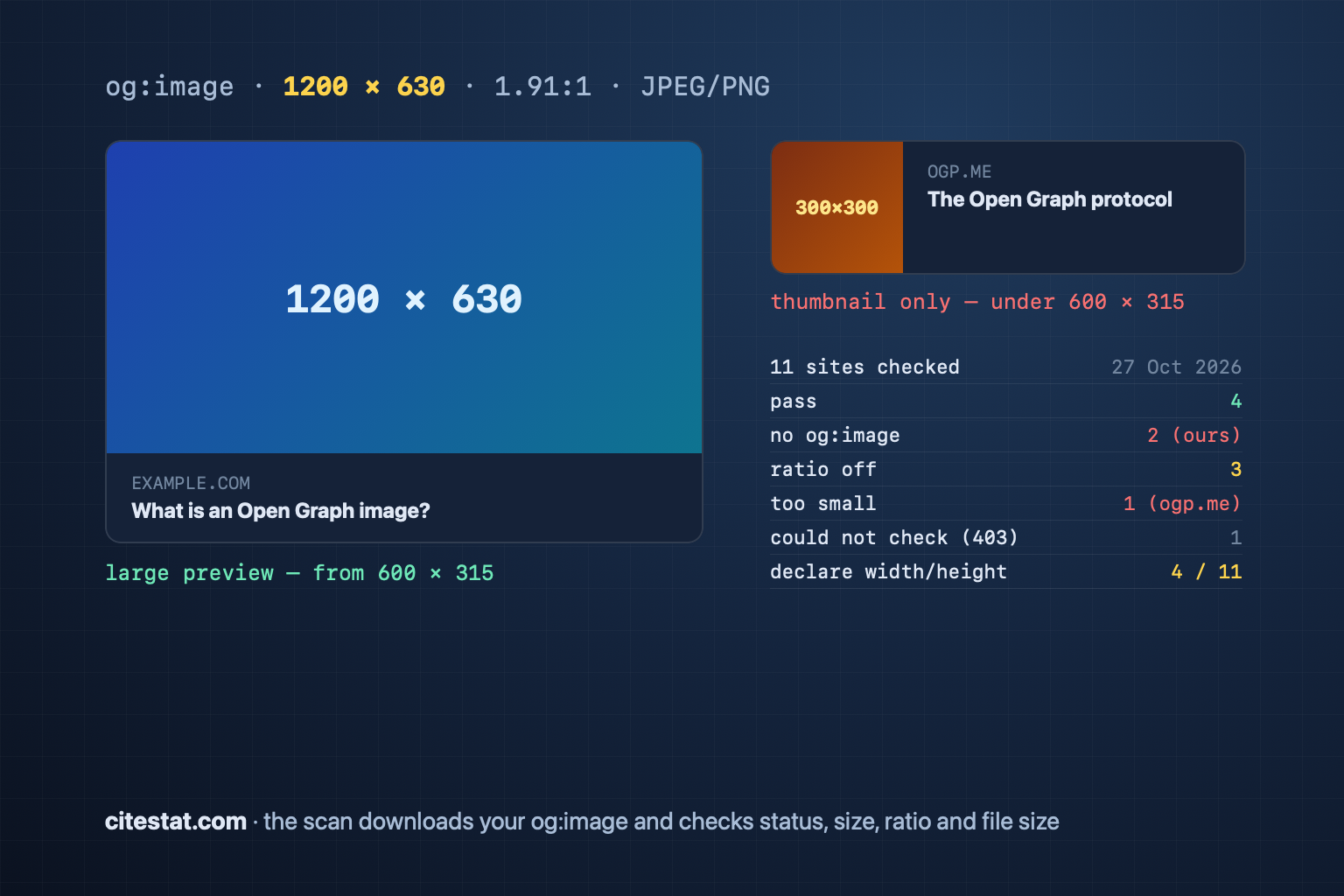
Short answer: An Open Graph image is the picture Facebook, LinkedIn and chat apps show when a link is shared. The page declares it with a <meta property="og:image"> tag. Make it 1200 × 630 px, close to 1.91:1, a JPEG or PNG, at a public https URL. A wrong preview usually comes from one of the seven faults below. On 27 October 2026 we checked 11 sites and found faults on ogp.me, the protocol's own site, and on ours.
The Open Graph tags you need
The Open Graph protocol names four required properties for every page. The others are optional but worth adding. They sit in the <head> with your other meta tags.
| Tag | Content | Required |
|---|---|---|
og:title | The title on the preview card | Yes |
og:type | website for a normal page, article for a post | Yes |
og:image | The absolute URL of the image | Yes |
og:url | The canonical URL of the page | Yes |
og:description | One or two sentences | Recommended |
og:image:width, og:image:height | Image size in pixels | Recommended |
og:image:alt | What the image shows (not a caption) | Recommended with og:image |
An example for a post:
<meta property="og:title" content="What is an Open Graph image?">
<meta property="og:type" content="article">
<meta property="og:url" content="https://example.com/blog/og-image">
<meta property="og:image" content="https://example.com/images/og-image-1200x630.jpg">
<meta property="og:image:width" content="1200">
<meta property="og:image:height" content="630">
<meta property="og:image:alt" content="A large link preview on Facebook">
<meta name="twitter:card" content="summary_large_image">
X reads its own twitter:card tag to pick the card type; summary_large_image is the one with a large image.
Image size: Meta's and LinkedIn's numbers
Use a 1200 × 630 px image under 5 MB: that size meets both Meta's and LinkedIn's recommendation.
| Facebook (Meta) | ||
|---|---|---|
| Recommended | at least 1200 × 630 px | at least 1200 × 627 px |
| Large preview | from 600 × 315 px | images under 401 px wide show as a thumbnail |
| Minimum | 200 × 200 px | — |
| Ratio | close to 1.91:1 | 1.91:1 |
| Max file size | 8 MB | 5 MB |
Sources: Meta's image guide and LinkedIn Help. One 1200 × 630 px JPEG under 5 MB meets both. On format: Meta's og:image:type tag lists only image/jpeg, image/gif and image/png, so use JPEG or PNG for the preview image; WebP and AVIF suit the images inside the page better.
Seven reasons a link preview looks wrong
- No og:image. The app picks some image from the page, or shows none.
- The image fails to load. The image URL returns 404, redirects to a login page, or is relative, like
/og.jpg. Use an absolute https URL. - The image is too small. Below 600 × 315 px, Facebook shows only a thumbnail beside the title.
- The wrong shape. A square or 3:2 image is cropped top and bottom in a 1.91:1 frame, and text in it can be cut off.
- Tags added by JavaScript. Social crawlers usually do not run JavaScript (see JavaScript SEO). Put the tags in the HTML your server sends. Meta's Sharing Debugger shows what its crawler read; a tag missing there is a tag the crawler did not see.
- The cache. Meta's image guide says Facebook caches images by URL and does not update them unless the URL changes. Change the image but keep the URL, and the preview keeps the old one. Put the new image at a new URL, then scrape again with the Sharing Debugger.
- The first share. The crawler fetches the image only when the link is first shared, so the first preview may have none. Meta's sharing guide advises declaring
og:image:widthandog:image:heightso the image loads properly the first time it is shared.
We checked og:image on 11 sites (27 October 2026)
We read the Open Graph tags and downloaded each og:image with the same checker the CiteStat scan uses (CiteStat's crawler), honouring each site's robots.txt. The list: our own site, ERPFit's company site, a few large tech sites, two Vietnamese news sites and ogp.me.
| Site | Missing required tag | Declared size | Image result |
|---|---|---|---|
| citestat.com/ | og:image | — | No image |
| citestat.com/en/wiki/open-graph | og:image | — | No image |
| citestat.com/en/blog/crux-report | — | 1536 × 1024 | Ratio off (1.50:1) |
| erpfit.com/ | — | — | Ratio off (1.50:1) |
| github.com/ | — | — | Pass |
| vercel.com/ | — | — | Pass |
| developers.cloudflare.com/ | — | — | Ratio off (1.75:1) |
| stripe.com/ | — | — | Pass |
| vnexpress.net/ | — | 1200 × 675 | Could not check (HTTP 403 to our crawler) |
| tuoitre.vn/ | — | 1200 × 630 | Pass |
| ogp.me/ | — | 300 × 300 | Too small, ratio off (1:1) |
What we took from it:
- Only 4 of 11 pass: github.com, vercel.com, stripe.com and tuoitre.vn.
- ogp.me, the protocol's own site, fails: its image is 300 × 300 px, under the 600 × 315 px floor, so Facebook shows a thumbnail.
- Our own site had two faults. The home page and the wiki had no og:image (a follow-up check found the same on pricing); blog images were 1.5:1, so they were cropped. We fixed both the same day: those pages share one 1200 × 630 px card, every blog post has its own 1200 × 630 px preview image, and all of them declare
og:image:width,og:image:heightandog:image:alt. - Only 4 of 11 declare the image size, one of them ours. Without those two tags, the first share on Facebook may show no image.
- A site can block a checker without blocking Facebook. vnexpress.net's CDN answered 403 to our crawler but 200 to Facebook's and Zalo's crawlers and to a browser. So the CiteStat scan says "could not check" (low) instead of reporting a broken image.
How to test a preview
- Paste the link into Meta's Sharing Debugger: it shows the tags it read, warns about faults, and scrapes the page again.
- For LinkedIn, use Post Inspector.
- Send the link to yourself in the chat app you use, to see the real preview.
- Run a CiteStat scan: it reads og:title, og:description, og:image and twitter:card from the HTML your server sends, downloads the og:image and checks its HTTP status, size, ratio and file size.
How CiteStat scores Open Graph
The rules engine checks og:title, og:description (weight 4 each) and og:image (weight 5) in the SEO score. The image download adds findings: an image that returns 404 or a server error is high; under 600 × 315 px or over 5 MB is medium; under 1200 × 630 px or the wrong ratio is low; an image that answers 401, 403 or 429 to our crawler is "could not check" (low). The check asks for no particular file format. Each finding links to the Open Graph wiki page with the fix.
A free account has 10 credits a day, and one SEO scan costs 1 credit. Pro has 100 credits a day and the full report; see pricing.
Frequently asked questions
What size should an Open Graph image be?
1200 × 630 px, close to 1.91:1, as a JPEG or PNG. Meta recommends at least 1200 × 630 px for a sharp display, 600 × 315 px as the floor for the large preview, and a file of 8 MB at most. LinkedIn asks for at least 1200 × 627 px and at most 5 MB, so one 1200 × 630 px image under 5 MB works for both.
Why does Facebook still show the old image after I changed it?
Because Facebook caches images by URL. Put the new image at a new URL (add ?v=2 or rename the file), then paste the link into Meta's Sharing Debugger and scrape again. Meta says images are cached by URL and are not updated unless the URL changes; the Sharing Debugger scrapes the page again at once.
Why does the first share show no image?
Facebook's crawler fetches the image only when the link is first shared, so the first preview may have none. Meta advises declaring og:image:width and og:image:height so the image loads properly the first time it is shared; you can also run the link through the Sharing Debugger before you share.
Do Open Graph tags help Google rankings?
Google's documentation does not list Open Graph as a ranking signal. Its title link guide does list og:title content as one of the sources it may use for a page's title link in results. The main value of Open Graph is the clicks that shared links bring.