Chrome Modern Web Guidance: SEO Impact and Our Own Scan
Chrome's Modern Web Guidance 1.0: 208 guides for coding agents and legacy-scan. What touches SEO and AI search, and how our site went from 2 findings to 0.
By — CTO, ERPFit
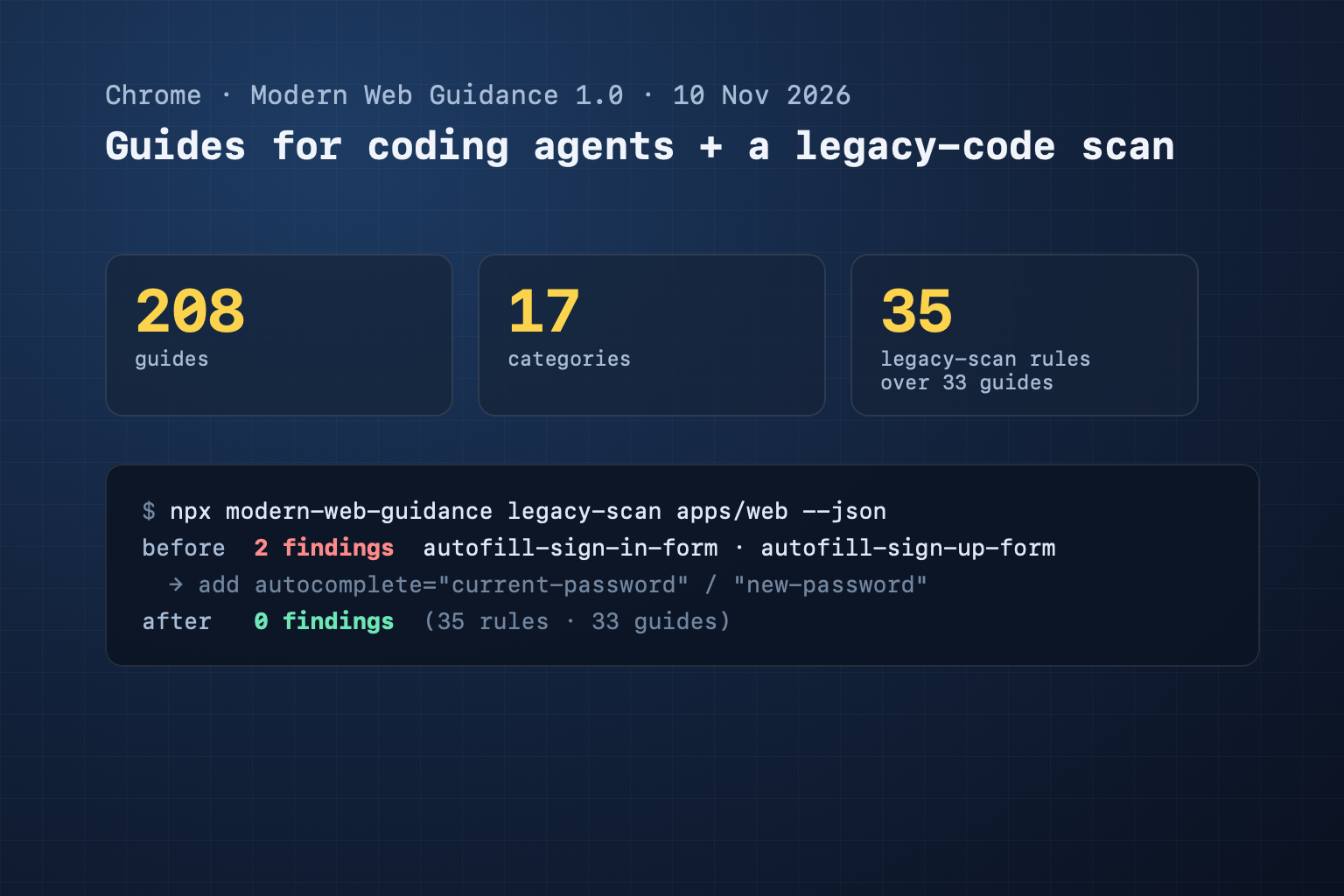
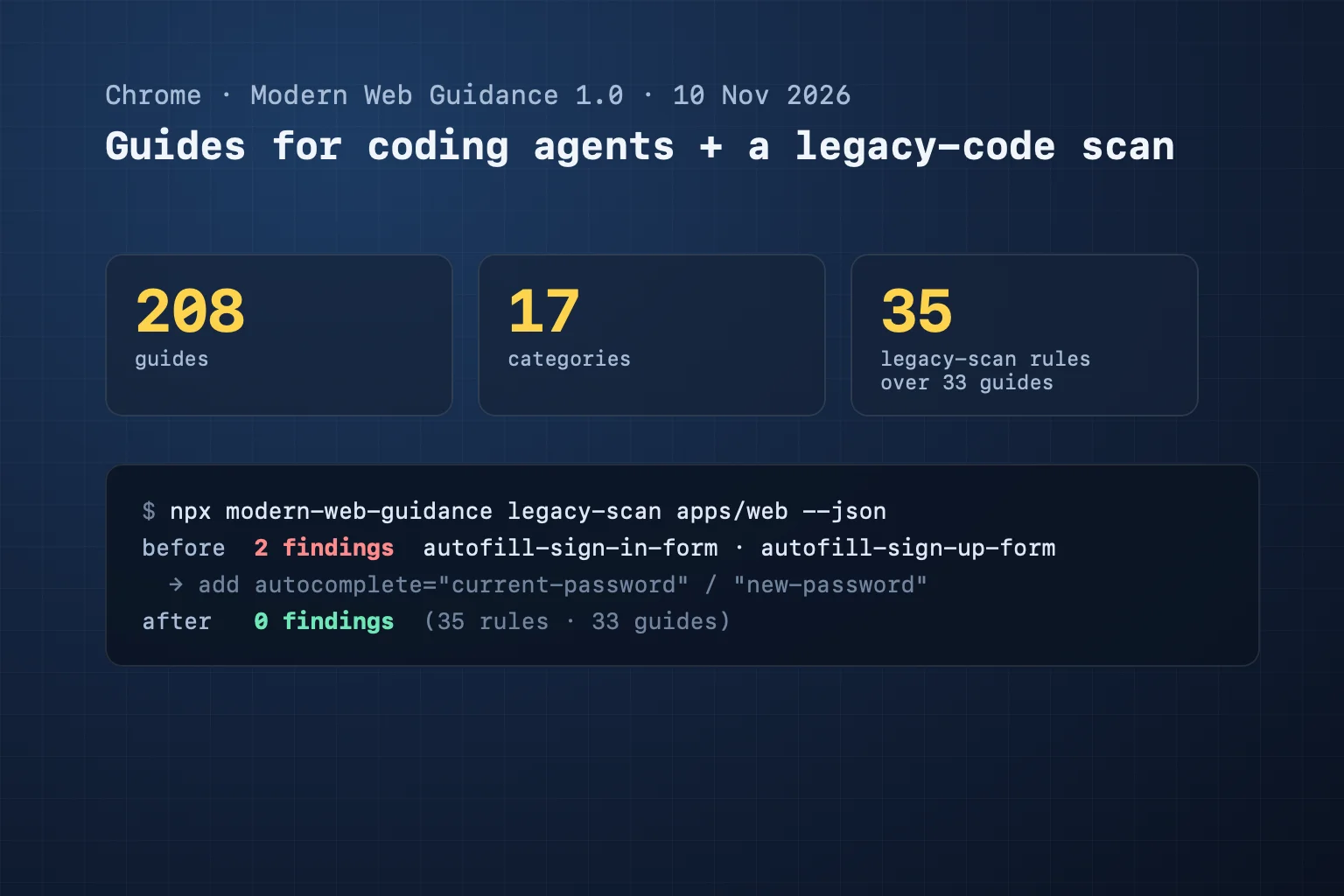
Short answer: Modern Web Guidance is a set of 208 guides, in 17 categories, that Chrome wrote for AI coding agents, so they build web pages the modern way instead of repeating old habits. Version 1.0 shipped on 10 November 2026, with Firefox and Edge joining. It is not a ranking factor, but many of its guides fix what Google and AI search do measure: INP, the LCP image, security headers, WebMCP. We ran its legacy-scan tool on this site: 2 findings, fixed in one commit, 0 on the re-scan.
Key Takeaways
- Install it for your agent with
npx modern-web-guidance@latest install. The guides cover performance, security, forms, accessibility, PWA, WebMCP and many UI topics. legacy-scanfinds outdated code in your source, with no LLM call. Version 1.0.0 has 35 rules over 33 guides; Chrome puts that at about 20% of the guides.- For SEO, start with INP (no main-thread task over 50 ms), LCP image priority, SRI and security headers, and text that follows the operating system text size.
- On our web app, legacy-scan flagged 2 password fields without
autocomplete. Fixed; the re-scan found 0. - A CiteStat scan reads the served page, so it checks most items that leave a mark in the HTML; autocomplete scores (only on pages that have a sign-in or sign-up field); speculation rules, Trusted Types, color-scheme, text-scale and media preload are reported without taking points.
What is Modern Web Guidance?
Modern Web Guidance is 208 guides in 17 categories that an AI agent reads before it writes web code, with data on which browsers support which feature. The problem it solves is familiar: ask an AI for a sign-in form and you often get code that works but follows old habits: no autocomplete, render-blocking scripts, a lazy-loaded hero image. Models learn from old code on the web, so they write old code; these "skills" give the agent a newer standard to follow.
According to Philip Walton's announcement of 10 November 2026, 1.0 is the stable release after an early preview at Google I/O in May, and Firefox and Edge now contribute to it. The guides catalog has 17 categories: Visual Design, UI Atoms, UI Components, UI Behaviors, User Experience, Forms, HTML, CSS, JavaScript, WebAssembly, Performance, Accessibility, Security, Privacy, PWA, Built-in AI and WebMCP.
Install it with one command, from your project directory:
npx modern-web-guidance@latest install
# already installed? update:
npx modern-web-guidance@latest update
From then on, when you ask your agent for "a sign-up form", it has forms/autofill-sign-up-form to follow instead of a guess.
How does legacy-scan work?
legacy-scan is a command-line tool that reads the source you already have and points at outdated patterns, with no LLM call. It is the first step of the modernization workflow added in 1.0; the modernization workflow page splits it into four steps:
- Scan: the agent runs
npx modern-web-guidance legacy-scan <path> --json. The tool pre-screens files for relevant strings, then runs AST, CSS and HTML parsers on the candidates only. - Contextual verification: the agent reads the code around each match and drops intentional cases, such as a fallback behind
@supports. - Report: the agent summarizes the verified findings and proposes a plan before editing.
- Retrieve, refactor, verify:
npx modern-web-guidance retrieve <guide-id>, refactor by the guide, re-run legacy-scan and the project's tests.
The precision bar is the interesting part. Chrome's modernization workflow page says the rules were tried on about 45,000 open-source repositories, tuned on one half and graded on the unseen half, and a rule ships only at 80% or more static matcher precision and 90% after the agent verifies the match. The same page estimates that a finding reaching the agent has about a 92% chance of not being a false positive. The trade-off is reach: legacy-scan covers about 20% of the guides, the ones where old code can be detected deterministically. There is no --fix flag, because many upgrades are cross-layer refactors.
What does Modern Web Guidance change for SEO and AI search?
The guides are written for coding agents, not for Googlebot or GPTBot. Following them is not a ranking signal. Chrome's announcement gives one number for what they do to code: at note inc., pass rates on modern web checks rose from 61% to 94% across a 180-run evaluation on its production codebase. As more website code is written by agents, the standard those agents follow decides whether your pages are fast, safe and usable by other agents. These are the guides that touch SEO and GEO:
| Category | Guides | SEO / AI search angle |
|---|---|---|
| Performance | break-up-long-tasks, identify-inp-causes | A main-thread task over 50 ms hurts INP, a Core Web Vital |
| Performance | optimize-image-priority, optimize-script-priority, optimize-preload-priority | An early LCP image, no render-blocking scripts |
| Performance | improve-next-page-load-performance, lazy-load-video-and-audio | Speculation rules for the next page; lazy-loaded video and audio |
| Security | security, secure-external-subresources, trusted-types | CSP, HSTS, nosniff, SRI on third-party scripts: trust signals, see HTTPS and security |
| Forms | forms, autofill-sign-in-form, autofill-sign-up-form | Correct autocomplete tokens; forms people and agents can fill |
| Accessibility | accessibility, respect-os-text-scale | Image alt text, page language, OS text size followed (the text-scale meta) on mobile |
| PWA | install-web-app | The web app manifest |
| WebMCP | webmcp, agentic-forms, agentic-javascript-tools | Pages that hand tools to a browser's AI agent, see our WebMCP post |
The rest (UI, CSS, JavaScript, WebAssembly, Built-in AI) are design and code choices; a served page leaves no stable signal a bot could read.
We ran legacy-scan on our own site: 2 findings to 0
On 12 November 2026 we ran legacy-scan 1.0.0 on the CiteStat web app directory (35 rules, 33 guides; the tool skipped 51 docs and test files on its own). Result: 2 findings, both real.
- autofill-sign-in-form: the password field on the sign-in form had no
autocomplete="current-password". - autofill-sign-up-form: the password field on the sign-up form had no
autocomplete="new-password".
Without those tokens a password manager has to guess which field is which: it may not offer the saved password, or may not suggest a strong one at sign-up. The fix is the right attribute, and while we were there, the fields next to it:
<!-- sign-in form -->
<input type="email" autocomplete="username">
<input type="password" autocomplete="current-password">

<!-- sign-up form -->
<input type="text" autocomplete="name">
<input type="email" autocomplete="email">
<input type="password" autocomplete="new-password">
Five attributes, one commit, every test still green. The re-scan: "totalFindings": 0. Nothing dramatic, and that is the point: on a codebase that has been through many review rounds, the tool still found two real issues and no false ones.
Check your own site: 8 items, mapped to the guides
If you have the source, npx modern-web-guidance legacy-scan . --json is the fastest route. If you only have the live site (a WordPress theme, a site an agency built), check these eight:
| # | What to check | Guide | Does a CiteStat scan report it? |
|---|---|---|---|
| 1 | The hero image has fetchpriority="high" and no loading="lazy" | performance/optimize-image-priority | Yes |
| 2 | No long tasks blocking the main thread; INP is good | performance/break-up-long-tasks | Yes (Lighthouse Total Blocking Time, INP from CrUX) |
| 3 | Scripts use async/defer; preloads are few | performance/optimize-script-priority | Yes |
| 4 | Third-party scripts carry integrity; CSP, HSTS, nosniff are set | security/secure-external-subresources, security/security | Yes |
| 5 | The head has <meta name="text-scale" content="scale"> and text is sized in rem or em | accessibility/respect-os-text-scale | Yes (report only) |
| 6 | Sign-in and sign-up fields carry the right autocomplete | forms/autofill-sign-in-form, autofill-sign-up-form | Yes (scored, weight 2) |
| 7 | Speculation rules for the pages people open next | performance/improve-next-page-load-performance | Yes (report only) |
| 8 | CSP has require-trusted-types-for 'script' | security/trusted-types | Yes (report only) |
Rows 5, 7 and 8 are report-only rules: they take no points until we have measured them on real pages. Row 6 scores (a warning, weight 2), and only on pages that have a sign-in or sign-up field; a page without one is not affected. The scan also reports color-scheme (the dark-mode guide) and video and audio preload. Blocking zoom is a different matter: it is a WCAG 1.4.4 failure, checked by the existing viewport rule. You can also view the page source (Ctrl+U) and search for text-scale, autocomplete and speculationrules.
What does CiteStat check?
A CiteStat scan reads the page a visitor receives: the HTML, the response headers and Lighthouse. It does not read your source code, so it can only check the guides that leave a mark in the page. The full list, including the partial ones (lazy loading is scored for images and only reported for video and audio; font-display yes, size-adjust fallbacks not yet), is on the Modern Web Guidance wiki page. For WebMCP, the scan looks for forms with toolname and registerTool() calls on the Agent Readiness card.
The two tools complement each other: legacy-scan looks from the source side, the scan from the side Google and AI crawlers actually receive. Scan one page for free to see which rows of the table above fail. The free plan includes 10 scans a day; for more, see pricing. We measured the six signals on 10 real sites, Chrome's own included: see the 10-site measurement.
What it is not
- Not a ranking rulebook. There is no Lighthouse audit of its own and no published JSON rule list to compare against.
- legacy-scan does not grade a website. It reads source code; without the source it has nothing to read.
- 0 findings does not mean a modern site. The tool covers about 20% of the guides; for the rest, the agent looks them up while writing new code.
Frequently asked questions
What is Modern Web Guidance?
A set of guides that teaches AI coding agents current web platform practice, with browser support data. Chrome released 1.0 on 10 November 2026, with Firefox and Edge joining; the catalog has 208 guides in 17 categories.
Does following Modern Web Guidance improve Google rankings?
Not directly. It helps because some guides fix what Google does measure, such as INP and LCP in Core Web Vitals, HTTPS and security headers.
What does legacy-scan check?
Outdated patterns in HTML, CSS, JavaScript/TypeScript, components and package.json, read locally with no LLM call. Version 1.0.0 has 35 rules over 33 guides, and it does not fix code itself.
Does legacy-scan report false positives?
It can, but rarely: Chrome ships a rule only at 80% or more static matcher precision and 90% after verification. Both findings on our site were real.
Does a CiteStat scan check Modern Web Guidance?
Partly: the guides that leave a mark in a served page. Autocomplete scores (a warning, weight 2, only on pages that have a sign-in or sign-up field); speculation rules, Trusted Types, color-scheme, text-scale and media preload are reported without taking points.
Sources: Modern Web Guidance 1.0 (Philip Walton, Chrome for Developers, 10 November 2026) · Guides catalog · Modernization workflow. legacy-scan result: run on 12 November 2026 on our web app.